
No Visible Crack, But MacBook Screen Broken? Here’s What You Need to Know
Cracked screen issues on a MacBook aren’t always visible — even if you can’t see a crack, flickering, lines, black spots or a blank display can still mean internal screen damage. Many MacBook users experience internal display failure even when the outer glass looks perfectly fine. This can be confusing and frustrating, especially when you’re trying to determine whether it’s a hardware defect, accidental damage, or something else entirely.
This guide breaks down why this happens, how to diagnose it, what repairs cost, and what to do next.
MacBook Screen Explained: Parts, Layers and How It Works
To understand how a MacBook screen can break internally without showing any visible crack, it helps to know what the screen is actually made of. A MacBook display is not a single piece – it is a screen assembly made up of multiple delicate components layered tightly together.
Main Components of the MacBook Screen Assembly
1. LCD panel (Liquid Crystal Display) + Outer Glass Layer
On all modern MacBooks, the LCD panel and the outer “glass” layer are permanently laminated together as one ultra-thin display unit. Although they form a single bonded piece, the two layers behave very differently when put under stress.
The LCD panel is made from microscopic liquid-crystal cells held between extremely thin glass sheets — often thinner than a credit card. This inner layer is highly fragile, and even light pressure or slight flexing can cause it to fracture internally.
The outer glass-composite layer, however, is designed to be tougher.
-
Older Intel Retina models use a thin sheet of cover glass.
-
Newer Apple-silicon models (M1, M2, M3) use an advanced laminated optical layer made from either glass or a glass-polymer composite.
This outer material is less brittle, more flexible, and significantly more impact-resistant than the LCD underneath. It can bend slightly and absorb pressure without cracking — which is why the display appears visually perfect from the top, even when the LCD beneath it has already shattered

2. Backlight & LED Illumination System
Behind the LCD panel are several ultra‑thin diffuser and backlight sheets, along with an LED backlight strip located at the bottom of the screen. The LED strip produces the light, and the backlight sheets spread it evenly across the entire display.
3. T‑CON Board (Timing Controller)
This tiny board, often integrated into the display assembly, controls image processing. Faults here can cause flickering, stripes, distortion, or complete display failure.
4. Flex Cables
Flexible ribbon cables carry data and power between the screen and the logic board.
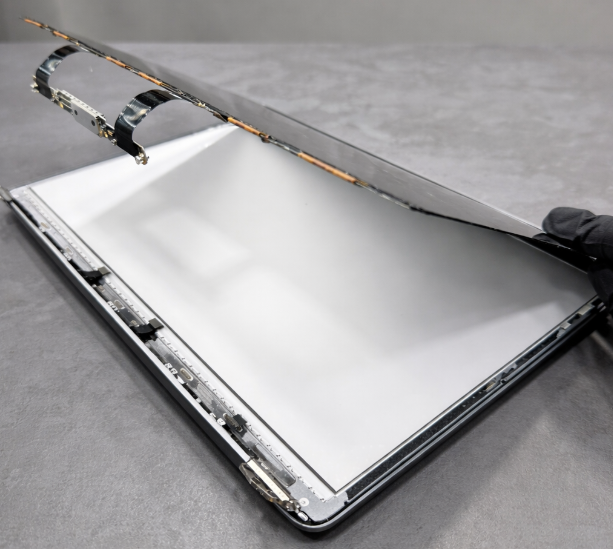
5. Screen Housing (Lid/Display Enclosure)
The aluminium housing holds all screen components together and attaches to the hinges. If the housing bends even slightly, it can put pressure on the internal layers. A MacBook doesn’t need to be “visibly bent” to cause damage. Even a 1–2 mm twist in the top case or bottom case can place tension on the lid, eventually cracking the LCD.
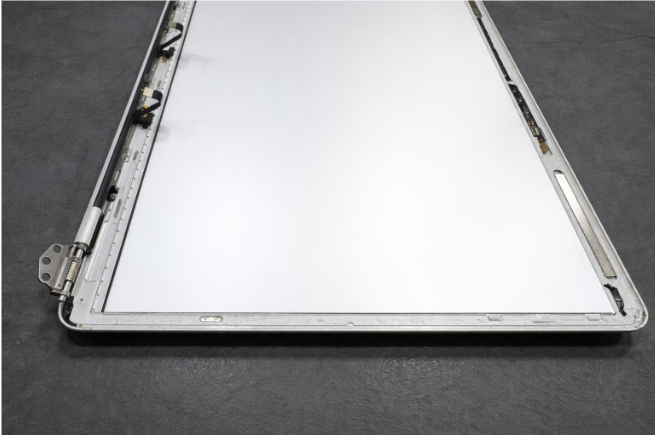
How These Components Work Together
-
The LED strip shines light upward.
-
The backlight sheets spread that light evenly.
-
The LCD panel uses liquid crystals to create the image.
-
The T‑CON board controls colour, movement, and brightness.
-
The ‘glass’ layer protects everything while allowing the image to show.
What Breaks First When Something Hits the Screen?
When a MacBook is dropped, squeezed in a bag, or pressed on the bezel, the part that usually breaks first is not the outer surface — it’s the LCD underneath. The outer glass-polymer layer is engineered to be tougher and less brittle than traditional glass, with a slight flex that helps it absorb minor pressure. Instead of cracking instantly, it can bend just enough to protect itself.
But the LCD behind it cannot bend. It is ultra-thin, rigid, and extremely delicate. So when stress travels through the outer layer, that force is transferred directly to the LCD, causing it to fracture internally while the top layer remains completely intact.
Why a MacBook Screen Can Break Internally Without Showing Any Visible Crack
Because of how the display assembly is constructed, internal LCD damage is not always visible from the outside. When the inner LCD layer fractures, the break occurs behind the outer optical layer, meaning there may be no visible crack, no dent, and no mark on the front surface.
To the user, the screen may suddenly go black, show lines, flicker, or develop expanding ink-blot patches — all without any sign of physical impact. In reality, the LCD has already cracked behind the front surface. This is the result of physical force (pressure, bending, a bag squeeze, or bezel stress), not a spontaneous failure or an issue caused by a previous repair.
Below are two images showing the same damaged LCD screen, photographed from the front and from the back, to highlight how LCD damage can appear differently depending on the viewing angle.
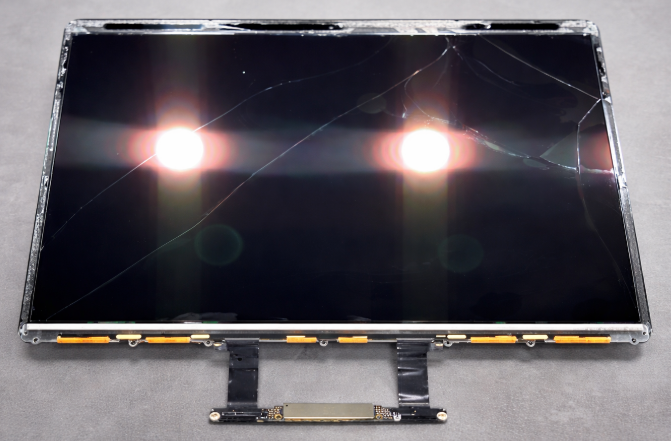
Back view of the LCD panel. From this side, the damage is clearly visible, showing that the LCD layer itself has cracked.
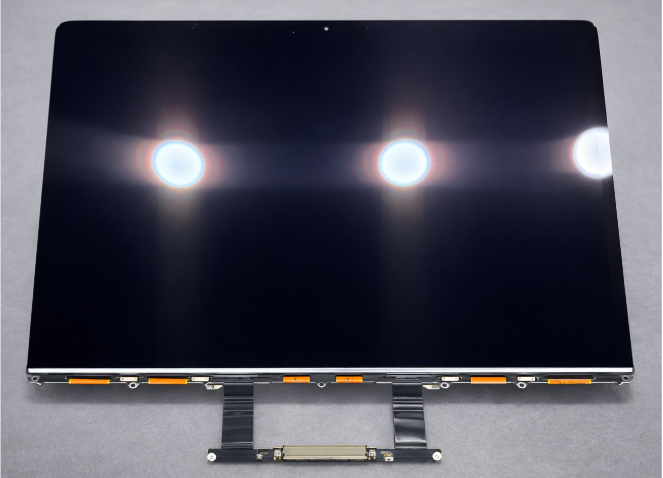
Front view of the same LCD screen. From the front, the glass appears largely intact with no obvious cracks, even though the LCD underneath has completely failed.
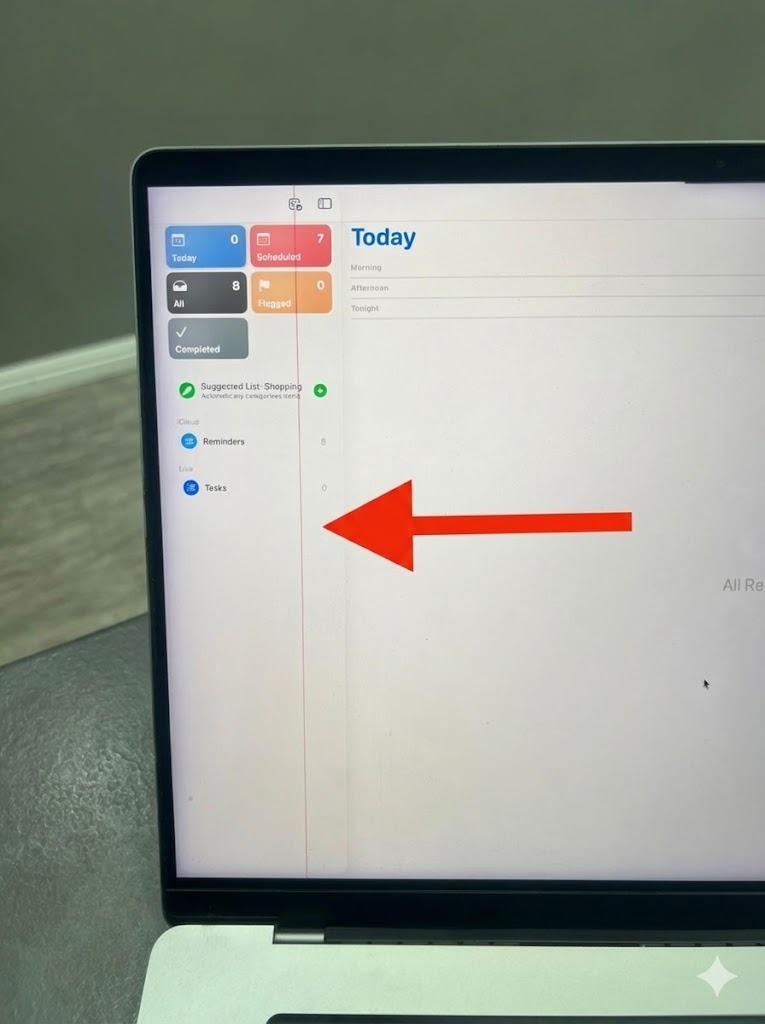
Damaged LCD Column Driver
Inside every LCD panel there are tiny column driver circuits bonded along the edge of the glass.
If one of those driver lines fails, the entire column of pixels it controls will show as a permanent vertical line as seen on the display in the image.
Can You Continue Using a MacBook With Internal Screen Damage?
Yes — if an external monitor works, you can keep using your MacBook like a desktop. But continued use of the Macbook screen with a flickering or damaged display can worsen internal damage.
What You Should Do If Your MacBook Screen Is Damaged
1. Backup Your Data Immediately
If the issue is hardware-related, things can get worse unexpectedly.
2. Visit a Repair Shop for Diagnosis
A technician can determine whether the damage is:
-
LCD failure
-
Backlight / flex cable issue
-
Logic board problem
3. Compare Repair Options
There are several repair options: Apple Store or Apple‑certified repair shops (slightly cheaper than Apple but independently operated and worth checking reviews for), independent repair shops that replace the full screen assembly using either genuine or non‑genuine parts (with genuine assemblies still priced close to Apple’s rates), and independent repair centres that offer LCD‑panel‑only replacements, which are the most cost‑effective when using high‑quality genuine OEM panels.
Final Thoughts
If your MacBook screen shows lines, black patches, or display distortion — even without a visible crack — there’s a strong chance the internal LCD is damaged. This type of damage is far more common than people realise, and it often happens without any obvious impact.
At our repair centre, we specialise in LCD‑only screen replacements, saving customers hundreds compared to full display assembly replacements.
Need your MacBook screen repaired quickly and affordably?
📞 Contact us today
🛠️ Same‑day or next‑day LCD replacements available
💷 Affordable pricing with clear diagnostics
Your MacBook can look brand new again — just get in touch and we’ll take care of the rest.