Two quick checks tell you exactly which iPad you have
Knowing the exact iPad lets us quote the right screen, battery or charging port before you book. Check it in iPadOS, or read the A-number printed on the back casing.
Method 1: Look it up in iPadOS
Unlock the iPad and tap the grey Settings icon.
Select General in the left-hand column.
Tap About at the top of the General list.
The Model Name line shows your iPad by name, for example iPad Air (5th generation).
Tap the Model Number line once and it switches from a part number starting with M to the A-number, such as A2588.
Method 2: Read the A-number on the back casing
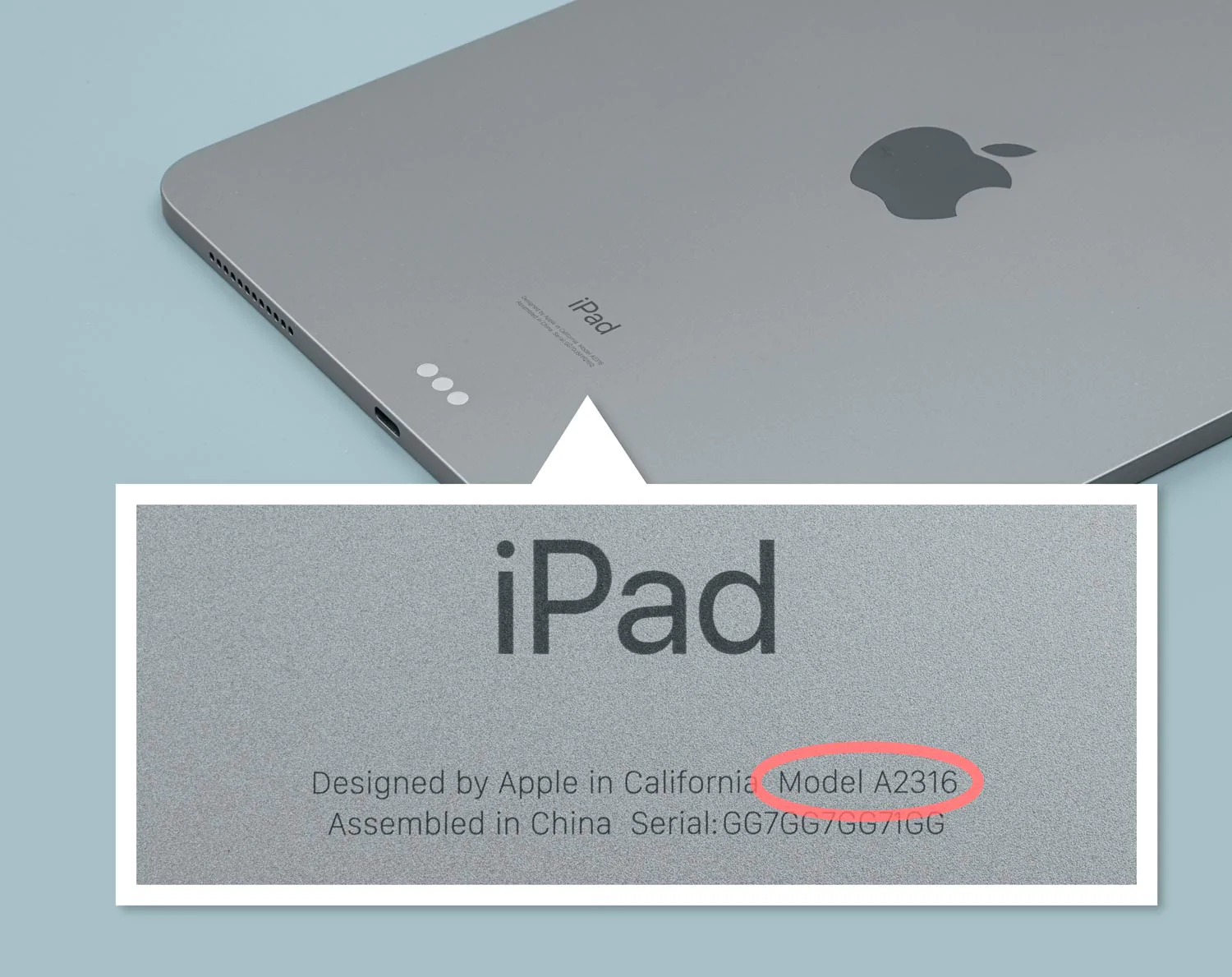
Turn the iPad over and look under the word iPad for a line of very small print.
Find the code that starts with a capital A and has four digits, e.g. A2602.
Match it against the table below to see your exact iPad model and generation.
Print hidden by a case or worn away? Use Method 1, or ask our team when you book a collection or visit our Whitechapel store.