Here’s how to find your iPad model
There are two easy methods to find your iPad model.
Method 1: Find the model name on your iPad settings.
- Open the "Settings" App
- Go to "General"
- Tap on "About"
- Find "Model"
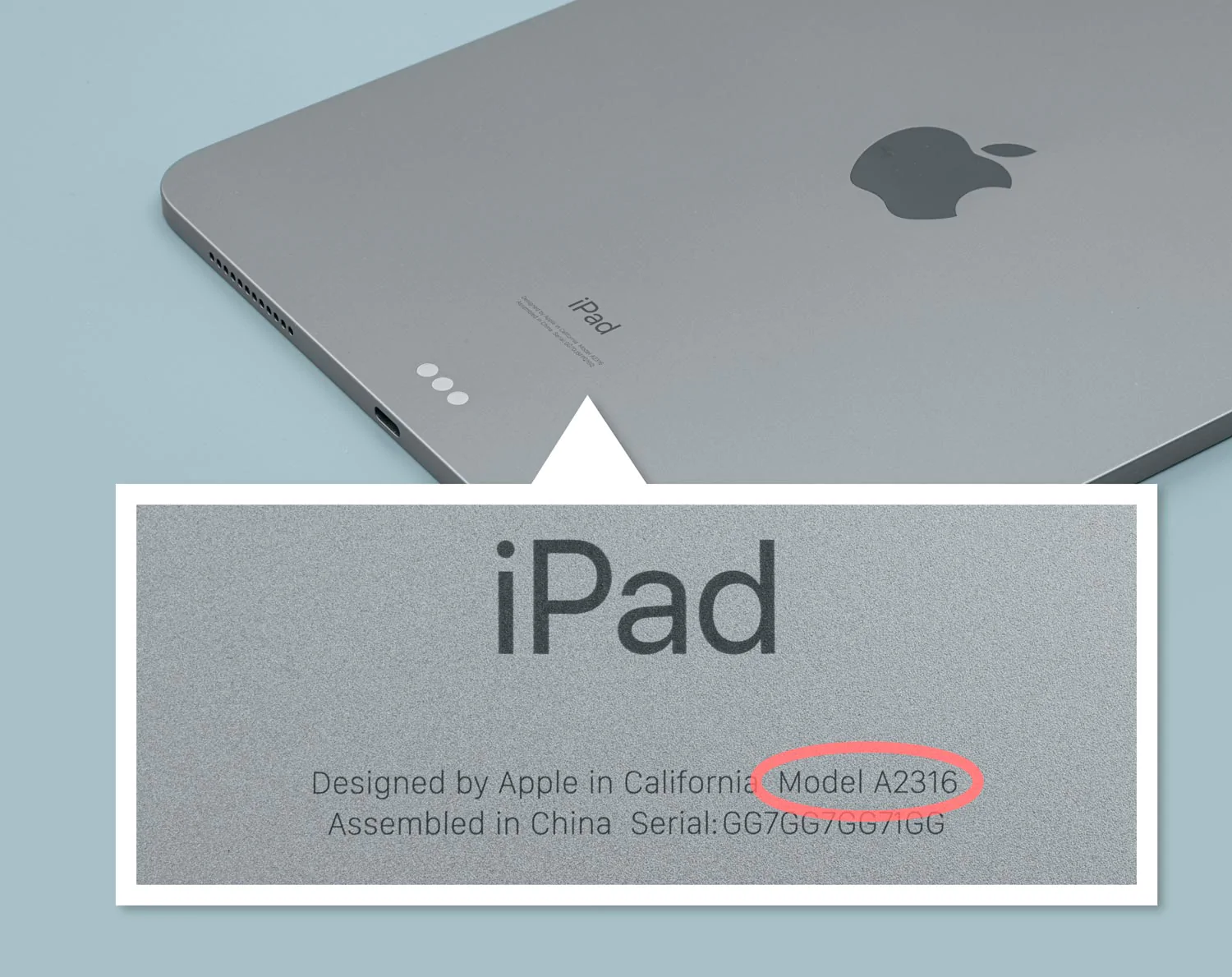
Method 2: Check the back of your iPad.
- By using the iPad model number, you can refer to the table below to determine the specific iPad model you own.
| Model Name |
Model Number |
| iPad mini 4 |
A1538, A1550 |
| iPad mini 5 |
A2126, A2124, A2133, A2125 |
| iPad mini 6 |
A2568, A2567, A2569 |
| iPad Air |
A1474, A1475, A1476 |
| iPad Air 2 |
A1566, A1567 |
| iPad Air 3 |
A2153, A2123, A2154, A2152 |
| iPad Air 4 |
A2324, A2072, A2325, A2316 |
| iPad Air 5 |
A2589, A2591, A2588 |
| iPad Pro 9.7 |
A1673, A1674, A1675 |
| iPad Pro 10.5 |
A1701, A1709, A1852 |
| iPad Pro 12.9 1st Gen |
A1584, A1652 |
| iPad Pro 12.9 2nd Gen |
A1670, A1671, A1821 |
| iPad Pro 12.9 3rd Gen |
A2014, A1895, A1876, A1983 |
| iPad Pro 12.9 4th Gen |
A2069, A2232, A2233, A2229 |
| iPad Pro 12.9 5th Gen |
A2378, A2379, A2461, A2462 |
| iPad Pro 12.9 6th Gen |
A2436, A2764, A2437, A2766 |
| iPad pro 11" 1st |
A2068, A2230, A2228, A2231 |
| iPad pro 11" 2nd Gen |
A2013, A1934, A1980, A1979 |
| iPad pro 11" 3rd Gen |
A2301, A2459, A2460 |
| iPad pro 11" 4th Gen |
A2759, A2435, A2761, A2762 |
| iPad 4th |
A1458, A1459, A1460 |
| iPad 5th |
A1822, A1823 |
| iPad 6th |
A1893, A1954 |
| iPad 7th |
A2197, A2200, A2198 |
| iPad 8th |
A2270, A2428, A2429, A2430 |
| iPad 9th |
A2602, A2604, A2603, A2605 |
| iPad 10th |
A2696, A2757, A2777 |
Model Finding - Video Instruction




_faee4ce7b4ddd15f0bb7f33e057f2a7b.jpeg)


