How to Find Your Macbook Model Name?
Step-by-step instructions to locate your Macbook model name and serial number
How to identify your Macbook model
Here are the steps to find your MacBook model
There are two easy ways to identify your MacBook: from macOS, or from the model number printed on the underside.
Method 1: Check "About This Mac" in macOS
- Click the Apple menu in the top-left corner of the screen.
- Choose "About This Mac".
- The model name and year are shown at the top of the window — for example "MacBook Pro 14-inch, 2023".
- For the exact model identifier, click "More Info" and then "System Report", where it is listed as "Model Identifier".
Method 2: Read the model number on the underside
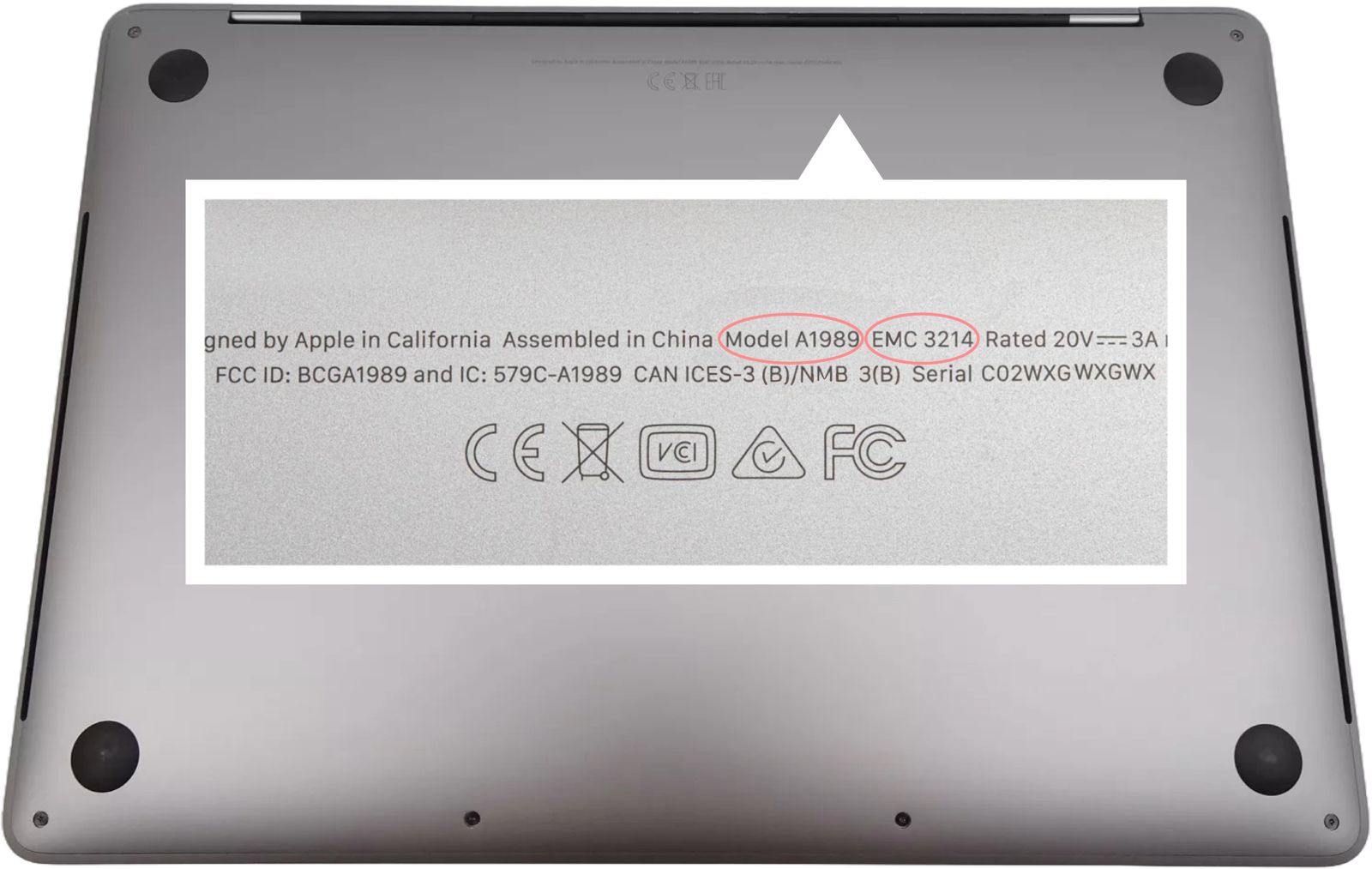
- Close your MacBook and turn it upside down.
- Read the small print near the hinge — it ends with a model number beginning with "A" followed by four digits, for example A2779.
- Match that A-number against the list below to find your model.
- If the print has worn away, use Method 1 instead, or send us the serial number and we will identify it for you.
Model Number Reference
| Model Name | Model Number |
|---|---|
| MacBook Air 13-inch | A1466, A1932, A2179, A2337, A2681, A3113 |
| MacBook Air 15-inch | A2941, A3114 |
| MacBook Pro 13-inch | A1502, A1708, A1706, A1989, A2159, A2251, A2289, A2338 |
| MacBook Pro 14-inch | A2442, A2779, A2918, A2992, A3401, A3185, A3426, A3427 |
| MacBook Pro 16-inch | A2141, A2485, A2780, A2991, A3403, A3186, A3428, A3429 |
| MacBook 12-inch | A1534 |
| MacBook Neo 13-inch | A3404 |
Ready to Repair Your Macbook?
Expert repairs for all major brands. Fast, reliable, and affordable service.
Warranty Protected
All macbook repairs backed by our comprehensive warranty
Fast Turnaround
Most Macbook repairs completed within 24-48 hours
Macbook Expert Technicians
Professionals with years of experience